How to Request a Mod on HappyMod
HappyMod is widely used by Android users who want access to modified versions of apps and games. While the platform already offers a large collection of mods, users may sometimes look for a specific app or game that is not yet available. In such cases, they can submit a request. As a result, developers may consider adding it in future updates.
To solve this, HappyMod provides a request system that allows users to ask for new mods. This feature helps connect users with mod creators and improves the availability of applications on the platform.
In this guide, you will learn how to request a mod on HappyMod, how the request system works, and what happens after you submit a request.
What Is a Mod Request on HappyMod?
A mod request is a user-submitted suggestion asking for a specific modified version of an app or game.
If a desired app is not available in the HappyMod library, users can submit a request so that mod developers or contributors may consider creating it.
This system helps expand the platform’s content based on user demand.
Why Users Request Mods
There are several reasons why users submit mod requests on HappyMod.
Some common reasons include:
- The app is not available in modded form
- The existing version does not work properly
- Users want updated or newer versions
- The game requires unlocked features
- Regional restrictions prevent access
- Older versions are preferred for compatibility
By collecting these requests, HappyMod can understand what users are looking for most.
How to Request a Mod on HappyMod
The mod request process is simple and usually takes only a few steps. Although the interface may vary depending on the version of the app, the general process remains similar.
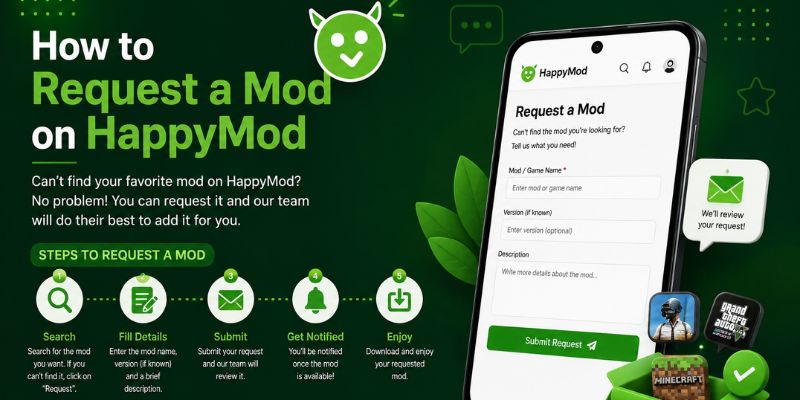
Step 1: Open the HappyMod App
Start by launching the HappyMod application on your Android device. Ensure that you are using the latest version for better performance and access to all features.
Step 2: Search for the Desired App
Use the search bar to check whether the app or game already exists in the database. Then, verify the results carefully. If found, proceed with the available version.
If it is not available, you will usually see an option to request it.
Step 3: Click on the Request Option
Tap on the “Request” or “Request Mod” button. This option allows you to submit your request to the platform.
Some versions may also show a form where you can enter details.
Step 4: Enter App Details
Provide accurate information about the app or game you want.
This may include:
- App name
- Version (if known)
- Special features required
- Notes or description
Clear and specific details increase the chances of your request being understood correctly.
Step 5: Submit the Request
After filling in the details, submit your request. It will then be added to the system where developers and contributors can view it.
Once submitted, you may not receive immediate results, as mod creation depends on availability and community response.
What Happens After You Submit a Request?
After submitting a mod request, the process depends on several factors.
Typically, your request may:
- Be reviewed by mod creators
- Be added to a public request list
- Receive votes or support from other users
- Be ignored if demand is low
- Be fulfilled if a working mod becomes available
Requests with higher user demand are more likely to be fulfilled.
Factors That Affect Mod Request Success
Not every request leads to a published mod. Several factors influence whether a request is completed. In addition, developer availability plays a key role. As a result, processing time may vary depending on complexity.
These include:
- Popularity of the app or game
- Difficulty of modifying the application
- Availability of working base versions
- Security or technical limitations
- Developer activity and community support
Highly popular apps usually have a better chance of being modded.
Tips to Increase Your Request Success
If you want your mod request to be noticed, consider the following tips:
- Provide clear and detailed app information
- Mention specific features you want
- Use correct spelling of app names
- Avoid duplicate requests
- Support your request with votes if possible
Well-described requests are easier for developers to understand and prioritize.
Common Issues with Mod Requests
Sometimes users may face issues while submitting or tracking requests.
These may include:
- Request option not visible
- App not listed in search results
- No response from developers
- Delayed mod creation
- Duplicate request entries
These issues are usually related to demand or platform limitations.
How Long Does It Take to Get a Mod?
There is no fixed time for mod creation.It depends on how complex the app is and whether developers are actively working on it. In addition, updates may vary based on project size. As a result, some apps receive faster improvements than others.
Some mods may appear within days, while others may take weeks or may not be created at all.
The timeline depends entirely on community support and technical feasibility.
Alternatives If Your Request Is Not Fulfilled
If your mod request is not completed, you can try alternative approaches.
These include:
- Searching for similar apps on HappyMod
- Checking older versions of the app
- Looking for alternative mod platforms
- Using official app versions with in-app features
These alternatives can help you still achieve similar functionality.
Final Thoughts
Requesting a mod on HappyMod is a simple process that allows users to suggest apps or games they want added to the platform. By submitting clear and detailed requests, users increase the chances of developers noticing their suggestions.
However, not all requests are guaranteed to be fulfilled, as mod creation depends on demand, technical complexity, and developer availability. Consequently, some requests may remain pending. In addition, priorities can change based on feasibility.Still, the request system plays an important role in expanding the HappyMod ecosystem and improving content availability for users. In addition, it helps identify user demand. As a result, the platform continues to grow with more relevant content.
Once you’ve submitted your mod request on Happymod, it’s also helpful to understand what happens before a mod is actually published. Happymod follows a verification process to check submitted mods and make sure they meet it’s publishing requirements.
If you want to learn more about how this process works, read our guide on “How Happymod Verifies Mods Before Publishing.”